
Written by Alexander Christian Greco
With the Help of ChatGPT
Abstract
Computer engineering sits at the intersection of electrical engineering and computer science. It explains how physical systems—wires, transistors, voltages, and clocks—can encode logic, perform calculations, and ultimately execute complex software programs. This article traces the full chain of abstraction: from electrical signals and boolean logic, through digital circuits and CPUs, to machine code, compilers, and high-level programming languages. By understanding this pipeline, we can see how abstract software instructions are grounded in real physical processes.
1. The Foundation: Electrical Signals as Information
At the deepest level, computers are electrical systems. Everything a computer does begins as changes in voltage over time.
1.1 Voltage Levels and Digital Meaning
Digital computers simplify the analog world by using discrete voltage ranges:
- Low voltage → interpreted as 0
- High voltage → interpreted as 1
These are not exact values but ranges (for example, 0–0.8V = 0, 2–5V = 1). This abstraction allows engineers to build reliable systems even with electrical noise.
This binary representation is the physical basis of:
- Numbers
- Text
- Images
- Programs
- Entire operating systems

2. From Signals to Logic: Boolean Algebra in Hardware
Binary values become meaningful through boolean logic, a mathematical system developed by George Boole.
2.1 Boolean Operations
Boolean logic uses simple operations:
- AND – true if both inputs are true
- OR – true if either input is true
- NOT – inverts the input
In hardware, these operations are implemented using logic gates.

2.2 Logic Gates as Physical Circuits
A logic gate is a small electronic circuit made from transistors.
Each gate:
- Accepts voltage inputs
- Produces a voltage output
- Enforces a logical rule
By combining gates, engineers can construct:
- Adders
- Comparators
- Multiplexers
- Memory elements
This is where abstract logic becomes physical behavior.

3. Transistors: The Atomic Unit of Computation
3.1 What a Transistor Does
A transistor is an electrically controlled switch:
- One signal controls whether another signal can pass
- It can amplify or block current
Modern CPUs contain billions of transistors, each switching billions of times per second.

3.2 CMOS Logic
Most modern computers use CMOS (Complementary Metal-Oxide-Semiconductor) technology:
- Combines n-type and p-type transistors
- Extremely low power consumption
- High switching reliability
Every logic gate, register, and memory cell ultimately reduces to CMOS transistor arrangements.
4. Combining Logic: From Gates to Functional Units

Individual gates are not very useful on their own. Power comes from composition.
4.1 Arithmetic Logic Unit (ALU)
The ALU is responsible for:
- Addition
- Subtraction
- Bitwise operations
- Comparisons
Internally, it consists of:
- Full adders
- Carry chains
- Logic selectors

4.2 Registers and Flip-Flops
Registers are small, ultra-fast memory units that:
- Store temporary values
- Hold instruction operands
- Track CPU state
They are built from flip-flops, circuits that remember a bit until told to change.
5. Time and Coordination: The Clock Signal
A computer is a synchronized system.
5.1 The Clock
The clock is a periodic electrical signal that:
- Tells circuits when to read inputs
- Tells registers when to update values
- Coordinates every operation in the CPU
Clock speed (e.g., 3.5 GHz) indicates how many cycles occur per second.
5.2 Why Timing Matters
Without a clock:
- Signals would arrive unpredictably
- Logic would race or conflict
- Results would be unreliable
Clocked design ensures determinism.
6. The CPU: Where Programs Become Action
The Central Processing Unit (CPU) is the heart of the computer.

6.1 Core Components
A CPU typically includes:
- Control Unit – directs operations
- ALU – performs calculations
- Registers – store immediate data
- Caches – high-speed memory
6.2 The Fetch–Decode–Execute Cycle
Every instruction follows this loop:
- Fetch – instruction retrieved from memory
- Decode – instruction interpreted
- Execute – hardware performs the operation
- Write-back – result stored
This cycle runs billions of times per second.
7. Machine Code: Programs the CPU Understands
7.1 Instructions as Binary Patterns
Machine code instructions are fixed-width binary patterns:
- Opcode (what to do)
- Operands (what data to use)
Example (simplified):
10110000 01100001
This might mean: load value 97 into register A.
7.2 Instruction Set Architecture (ISA)
The ISA defines:
- Available instructions
- Register layout
- Memory addressing modes
Common ISAs include x86, ARM, and RISC-V.

8. Memory: Storing Data and Programs
8.1 RAM as Electrical Storage
RAM stores bits using:
- Capacitors (DRAM)
- Flip-flops (SRAM)
Each bit is still a physical electrical state.
8.2 Memory Hierarchy
Speed vs size tradeoff:
- Registers (fastest, smallest)
- Cache
- RAM
- Storage (SSD/HDD)
Programs constantly move data through this hierarchy.

9. From Machine Code to Human Code
Humans do not write machine code directly.
9.1 Assembly Language
Assembly provides symbolic names:
MOV AX, 5
ADD AX, 3
Each line maps nearly one-to-one with machine instructions.
9.2 High-Level Languages
Languages like C, Python, and Java:
- Abstract away hardware details
- Introduce variables, functions, objects
- Improve safety and productivity
10. Compilers: Translating Ideas Into Circuits
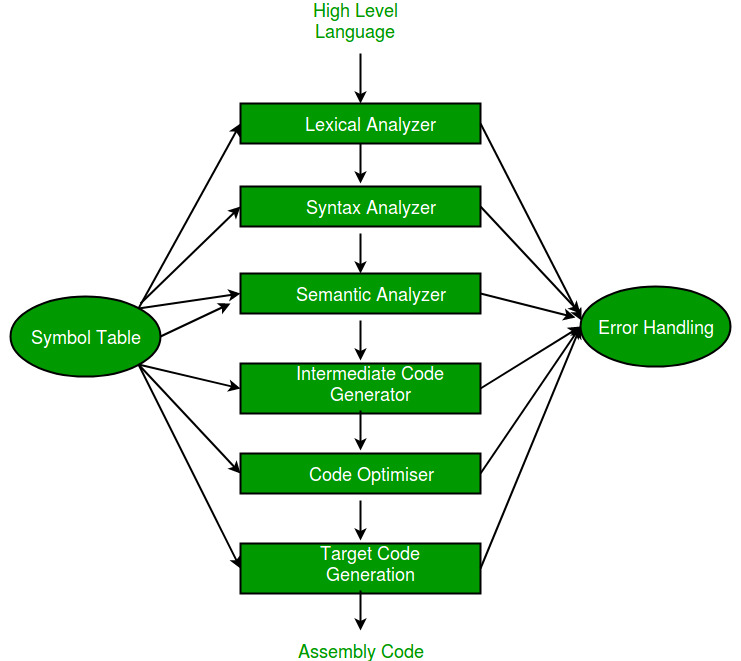
A compiler transforms:
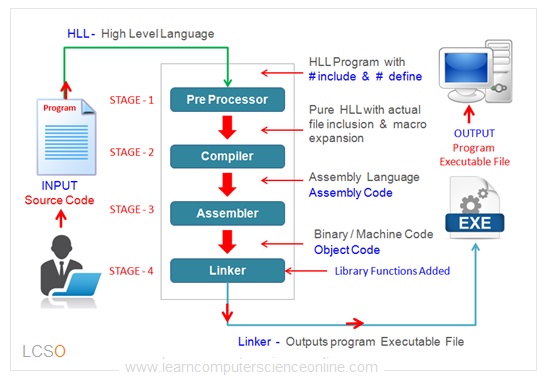
Human logic → machine instructions
10.1 Compiler Stages
- Lexical analysis – text → tokens
- Parsing – tokens → syntax tree
- Optimization – improve performance
- Code generation – emit machine code
Each generated instruction ultimately controls transistors.
11. Operating Systems: Managing the Hardware
Operating systems coordinate:
- CPU time
- Memory access
- Input/output devices
They rely on:
- Interrupt signals
- Privileged instructions
- Hardware protection mechanisms
Every OS feature still rests on electrical enforcement.
12. Abstraction Layers: Why This Works
Computer engineering succeeds because of layered abstraction:
| Layer | Description |
|---|---|
| Physics | Electrons and voltages |
| Devices | Transistors |
| Logic | Gates and circuits |
| Architecture | CPU and memory |
| Machine Code | Binary instructions |
| Languages | Human-readable logic |
| Applications | Real-world software |
Each layer hides complexity while preserving correctness.
13. Why Understanding This Matters
Understanding how hardware encodes programs:
- Improves performance-aware programming
- Explains limitations like latency and power
- Enables better system design
- Bridges theory and practice
Software is not magic—it is controlled physics.
Conclusion
Computer engineering reveals how simple physical principles—electricity, switching, and timing—can scale into machines capable of executing complex programs, simulating worlds, and powering modern society. From voltage levels and transistors to boolean logic, CPUs, and high-level languages, every abstraction rests on a carefully engineered physical foundation. Understanding this connection not only deepens technical knowledge but also highlights the elegance of turning raw energy into computation, logic, and meaning.
Leave a Reply