
Written by Alexander Christian Greco
With the Help of ChatGPT
Introduction
Computer science is frequently reduced to “learning how to code,” but this description obscures the discipline’s true scope. At its core, computer science is the systematic study of computation, information, and automated processes. Software is the primary medium through which these ideas are expressed, tested, and deployed in the real world.
Software acts as the logical interface between human intent and machine execution. It transforms raw hardware into systems capable of reasoning, communication, creativity, and large-scale coordination. Nearly every modern domain—science, medicine, finance, education, entertainment, and governance—relies on software systems grounded in computer science principles [1].
This article introduces the foundations of computer science with a specific emphasis on software, explaining how software is defined, structured, executed, and maintained. Rather than focusing on any single programming language or toolchain, the discussion centers on enduring concepts that remain relevant across decades of technological change.
1. What Is Software?
Software is a collection of instructions and data that directs a computer’s hardware to perform specific tasks. These instructions are encoded symbolically, stored digitally, and executed electronically.
At the most fundamental level, software consists of:
- Algorithms (procedures for solving problems)
- Data representations (ways of encoding information)
- Control logic (rules that determine execution order)
Unlike hardware, software is intangible. It can be copied perfectly, modified rapidly, and distributed globally at minimal cost—features that explain its central role in modern society [2].
Software vs. Hardware
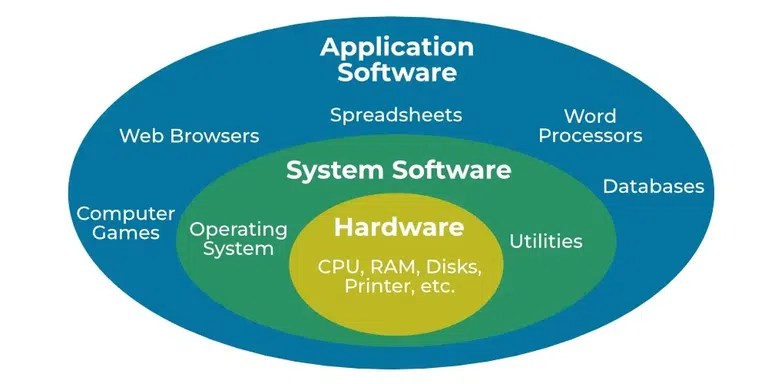
Without software, hardware has no purpose. Conversely, software cannot exist without hardware. Computer science studies this relationship formally.
2. Major Categories of Software
Software systems are commonly grouped into three broad categories: system software, application software, and development software.
2.1 System Software
System software manages the internal operation of a computer and provides essential services to other programs. The most prominent example is the operating system.
Modern operating systems such as Windows, macOS, and Linux perform tasks including:
- Process scheduling
- Memory management
- File system control
- Hardware abstraction
- Security enforcement
System software ensures that application programs can run reliably without needing direct control over hardware [3].
2.2 Application Software
Application software is designed for end users, enabling them to perform specific tasks such as writing documents, analyzing data, communicating, or creating media.
Examples include:
- Web browsers
- Office productivity tools
- Media editors
- Scientific modeling software
- Games and simulations
Applications rely on operating systems to handle low-level operations, allowing developers to focus on user-facing functionality.
2.3 Development Software
Development software enables the creation of other software systems. This includes:
- Compilers and interpreters
- Integrated Development Environments (IDEs)
- Debuggers
- Build systems
- Version control platforms
Programming languages such as Python, Java, C, and JavaScript are themselves software artifacts, designed to express computation in structured, human-readable forms [4].
3. How Software Works: From Code to Execution

Understanding software requires understanding how symbolic instructions ultimately control physical systems.

3.1 Source Code
Software begins as source code, written by humans using programming languages. Source code defines:
- Data structures
- Algorithms
- Logical constraints
- Input/output behavior
Programming languages are designed to balance expressiveness, safety, and performance.
3.2 Translation: Compilation and Interpretation
Computers execute instructions in machine code, not high-level languages. Translation bridges this gap.
- Compilation converts source code into machine code before execution.
- Interpretation translates and executes instructions incrementally.
Many modern platforms use a hybrid approach combining compilation, interpretation, and runtime optimization [5].
3.3 Execution and the Instruction Cycle
During execution:
- Instructions are loaded into memory
- The CPU fetches an instruction
- The instruction is decoded
- The instruction is executed
- Results are stored
This fetch–decode–execute cycle occurs billions of times per second, enabling complex software behavior.
4. Core Software Concepts in Computer Science
Several foundational concepts govern all software systems.
4.1 Algorithms
An algorithm is a finite, well-defined procedure for solving a problem.
Computer science evaluates algorithms by:
- Correctness
- Time complexity
- Space complexity
- Scalability
Algorithms form the theoretical backbone of software performance [6].
4.2 Data Structures
Data structures define how information is stored and accessed.
Common structures include:
- Arrays and lists
- Stacks and queues
- Trees
- Hash tables
- Graphs
The choice of data structure directly impacts efficiency, memory usage, and maintainability.
4.3 Control Flow
Control flow determines how execution proceeds through a program.
Key mechanisms include:
- Conditional branching
- Iteration
- Function calls
- Error handling
Control flow enables software to respond dynamically to input and environment changes.
5. Software Abstraction and Layering
Abstraction is a central principle in computer science.
Abstraction hides implementation details behind well-defined interfaces, allowing developers to reason about systems at different levels.

Typical Abstraction Layers
- Physical hardware
- Firmware
- Operating system
- System libraries
- Application frameworks
- End-user software

Abstraction reduces complexity, improves reliability, and enables large-scale collaboration [7].
6. Programming Paradigms
Programming paradigms define different ways of structuring software.
6.1 Procedural Programming
Programs are written as sequences of instructions and procedures. This paradigm emphasizes clarity and order.
6.2 Object-Oriented Programming (OOP)
Software is organized around objects that combine data and behavior.
Core principles include:
- Encapsulation
- Inheritance
- Polymorphism
OOP supports modularity and reuse [8].
6.3 Functional Programming
Functional programming treats computation as mathematical function evaluation, emphasizing immutability and declarative logic.
Modern software systems often blend paradigms to balance clarity, safety, and performance.
7. Software Engineering and Design
Computer science provides theory; software engineering applies it in practice.
7.1 Design Principles
Effective software design emphasizes:
- Modularity
- Separation of concerns
- Simplicity
- Readability
- Reusability
These principles reduce long-term costs and errors.
7.2 Testing and Debugging
Testing verifies correctness; debugging identifies faults.
Common testing strategies include:
- Unit testing
- Integration testing
- System testing
Testing is essential for reliability and security [9].
7.3 Maintenance and Evolution
Most software effort occurs after initial development. Maintenance includes:
- Bug fixes
- Security updates
- Performance optimization
- Feature expansion
Well-designed software anticipates change.
8. Software in the Real World
Software underpins nearly every modern system:
- Web platforms
- Mobile applications
- Embedded devices
- Scientific simulations
- Artificial intelligence
- Financial infrastructure
- Cybersecurity systems
Each domain applies the same foundational principles in different contexts [10].
9. Why Software Matters in Computer Science
Software is where abstract computation becomes tangible reality. It allows:
- Knowledge to be formalized
- Processes to be automated
- Systems to scale globally
- Human creativity to be amplified
Computer science provides the theoretical framework; software is its most visible and impactful expression.
Conclusion
Computer science is fundamentally the study of software systems—how they represent information, execute logic, and interact with hardware and society. Understanding software at a conceptual level enables individuals to learn new technologies efficiently, design robust systems, and reason critically about digital infrastructure.
As software continues to shape the modern world, literacy in its principles is no longer optional. It is a foundational component of education, innovation, and informed citizenship.
References
- Denning, P. J. (2007). Computing is a natural science. Communications of the ACM.
- Brooks, F. P. (1987). No Silver Bullet—Essence and Accidents of Software Engineering. IEEE Computer.
- Tanenbaum, A. S., & Bos, H. (2015). Modern Operating Systems. Pearson.
- Sebesta, R. W. (2019). Concepts of Programming Languages. Pearson.
- Aho, A. V., Lam, M. S., Sethi, R., & Ullman, J. D. (2006). Compilers: Principles, Techniques, and Tools. Pearson.
- Cormen, T. H., et al. (2022). Introduction to Algorithms. MIT Press.
- Parnas, D. L. (1972). On the Criteria to Be Used in Decomposing Systems into Modules. Communications of the ACM.
- Gamma, E., et al. (1994). Design Patterns. Addison-Wesley.
- Myers, G. J., Sandler, C., & Badgett, T. (2011). The Art of Software Testing. Wiley.
- Sussman, G. J., & Abelson, H. (1996). Structure and Interpretation of Computer Programs. MIT Press.
Further Reading
Books
- Code: The Hidden Language of Computer Hardware and Software — Charles Petzold
- Clean Code — Robert C. Martin
- The Pragmatic Programmer — Andrew Hunt & David Thomas
Academic & Educational
- MIT OpenCourseWare – Computer Science
- Stanford CS curriculum materials
- ACM Digital Library
Online Resources
- Mozilla Developer Network (MDN)
- FreeCodeCamp
- CS50 (Harvard University)
Leave a Reply